
Copy and paste to seamlessly embed interactive maps on your website
You can create an embedded Google Map without writing any code or using complex APIs. Simply copy and paste your location data into BatchGeo, and our online mapping software automatically generates an interactive map for you. Each map is securely hosted on BatchGeo servers and embedded directly into your website using lightweight embed code that we provide.
BatchGeo eliminates the need to write JavaScript or manage the Google Maps API. With our easy map maker and custom mapping tool online, you can quickly create a map from spreadsheet data, embed maps on any website, and display locations in a clean, professional, and fully interactive way.
Get StartedExample of embedded map
Live Example of an Interactive Embedded Google Map Built from Spreadsheet Location Data Using BatchGeo
Above you see an example of a map that was created using BatchGeo and has been embedded in this page. There are a number of ways to share your maps, including with a direct link to the full screen version, a snapshot map badge, and the popular seamless embed you see above.
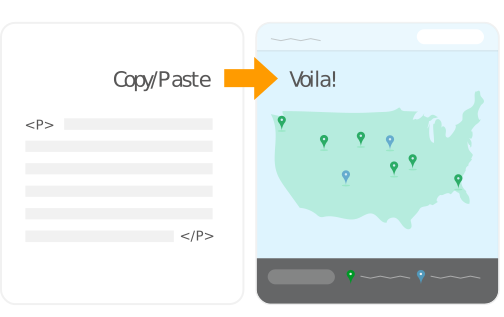
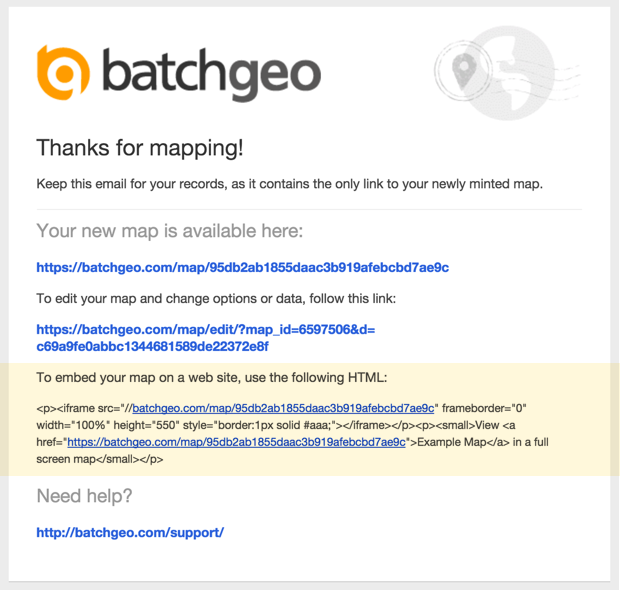
After you add your data to create your map using our interactive workflow, you will be given the option to save it. Make sure you include your email address while saving the map and you will be automatically emailed a copy of the code needed to embed the map your web site. Saving a map also gives you the option to change it in the future with updated data, a different underlying style, or other advanced mapping features.
Below is an example of the email you will receive with the embed code.
BatchGeo's embedded maps go beyond the basic capabilities of a Google Map without requiring any programming knowledge. You copy and paste your Excel data (or other spreadsheet) with location and other data. The addresses, zip codes, and other locations are quickly geocoded into map coordinates. These latitude and longitude values are stored along with your descriptive data, such as titles of each place, or other values like sales numbers. All of this data, both geographic and otherwise, is then available to the BatchGeo engine.
In the case of the example above, each location contains the airport's name, its country, its airport code, and the number of annual passengers who pass through the airport. Your visitors can click on your embedded map to see more about the place each marker represents. Additionally, BatchGeo's grouping technology allows users to filter the map by certain ranges of passenger volume, or by country.
It would take a programmer many hours to create and maintain even one embedded map with the interactivity available within BatchGeo's tool.
Map Badges
In addition to the traditional embedded map, BatchGeo provides a locator map badge for your website. When you don't want to devote the space required for a full map, these badges are a great option to provide a quick preview of your map. Visitors to your website can click to see the entire map, including the data within each marker.
Above you can see the badge version of the World's Busiest Airports. This map badge is a simple image, so it can even be saved and shared in non-web formats. Despite their small size, a lot of information can still be communicated in just a little space.
To see your data in a map badge or fully embeddable Google Maps, try BatchGeo now.
Watch these short videos
For more information on how to create and embed maps using Excel spreadsheet data, watch our short videos.
5 Ways To Make Your Map Stand Out
Make your BatchGeo maps stand out with these 5 simple tips! In this tutorial, we'll show you how to make your maps more interactive, informative, and visually engaging so your data tells a story that stands out.
Choropleth Style Boundary Maps
Create stunning choropleth style maps, also known as boundary maps, right from your spreadsheet data using BatchGeo.
Frequently Asked Questions
How do I embed a BatchGeo map on my website?
After saving your map, you'll receive an email with embed code. Copy the HTML iframe snippet and paste it into your website's HTML. No JavaScript or API key is needed. The map is hosted on BatchGeo servers and renders seamlessly within your page.
Can I embed a map in WordPress, Squarespace, or other CMS platforms?
Yes. BatchGeo's embed code works with any platform that supports HTML iframes, including WordPress, Squarespace, Wix, Shopify, and Blogger. Simply paste the embed code into an HTML block or custom code widget in your page editor.
What is a map badge and when should I use one?
A map badge is a small static image preview of your map that links to the full interactive version. Use it when you don't have space for a full embedded map, such as in sidebars, email newsletters, or small website sections.
Will my embedded map update automatically when I edit the data?
Yes. The embed code points to your hosted map on BatchGeo servers. Whenever you update the map data using the edit link, the embedded version on your website reflects the changes automatically with no need to update any code.
Are embedded BatchGeo maps mobile-responsive?
Yes. BatchGeo maps automatically resize to fit the viewer's screen, whether they're on a desktop, tablet, or smartphone. The embed uses responsive design so your map looks great on any device. Learn more about our mobile optimization.